Google Ads Optimization for DTC: PMax, Brand Split and MER
By
Frank Kenne
October 27, 2026
•
5 min read
Share this post
Introduction
To optimize a Google Ads account for ecommerce, fix conversion tracking first, split brand search out of Performance Max, feed the algorithm a clean product feed, and judge everything against blended MER and new-customer revenue instead of in-platform ROAS. This guide covers the structure we use for DTC brands, the PMax vs. brand-split decision, and a weekly checklist you can run in under an hour.
Clean tracking, brand split out, a strong feed, and MER as the scoreboard.
Every bidding strategy in Google Ads is only as smart as the conversions you send it. Before touching structure, check four things:
One primary purchase conversion. Use the Google & YouTube app for Shopify or Google Tag (gtag/GTM) with a single primary "Purchase" action. Mark add-to-cart, begin checkout and page views as secondary so they don't drive bidding.
Enhanced conversions on. Sending hashed first-party data (email, phone) improves match rates as browser cookies fade.
Consent mode configured if you sell into regions that require it, so modeled conversions fill the gaps.
Values that mean something. Pass real order revenue, and if you can, exclude tax and shipping. Brands with very different margins by product can send a margin-adjusted value, but only once the basics are stable.
Then reconcile: Google-reported revenue for a week should be in a sensible range compared with Shopify revenue for orders that came through Google. If Google claims more than your store sold, you have duplicate tags or a conversion counting everything.
Account structure for DTC in 2026
Most ecommerce accounts we audit are either over-split (dozens of tiny campaigns that never exit learning) or under-split (one PMax campaign eating everything, including brand). The version that works for most DTC brands between roughly $10k and $200k a month on Google is simple:
Brand Search – exact and phrase brand terms, its own small budget, target impression share or manual CPC caps.
Performance Max (non-brand) – one to three campaigns grouped by margin or product tier, with brand exclusions applied.
Standard Shopping (optional) – for hero SKUs or for testing when you want query-level control PMax doesn't give you.
Non-brand Search – high-intent category and competitor-adjacent terms, only where search volume justifies it.
YouTube / Demand Gen (optional) – once the core is profitable and you have video creative from your Meta testing.
Fewer campaigns with more data per campaign usually beats granular control. Split only when products have meaningfully different margins, price points or goals.
PMax vs. brand split: the specifics
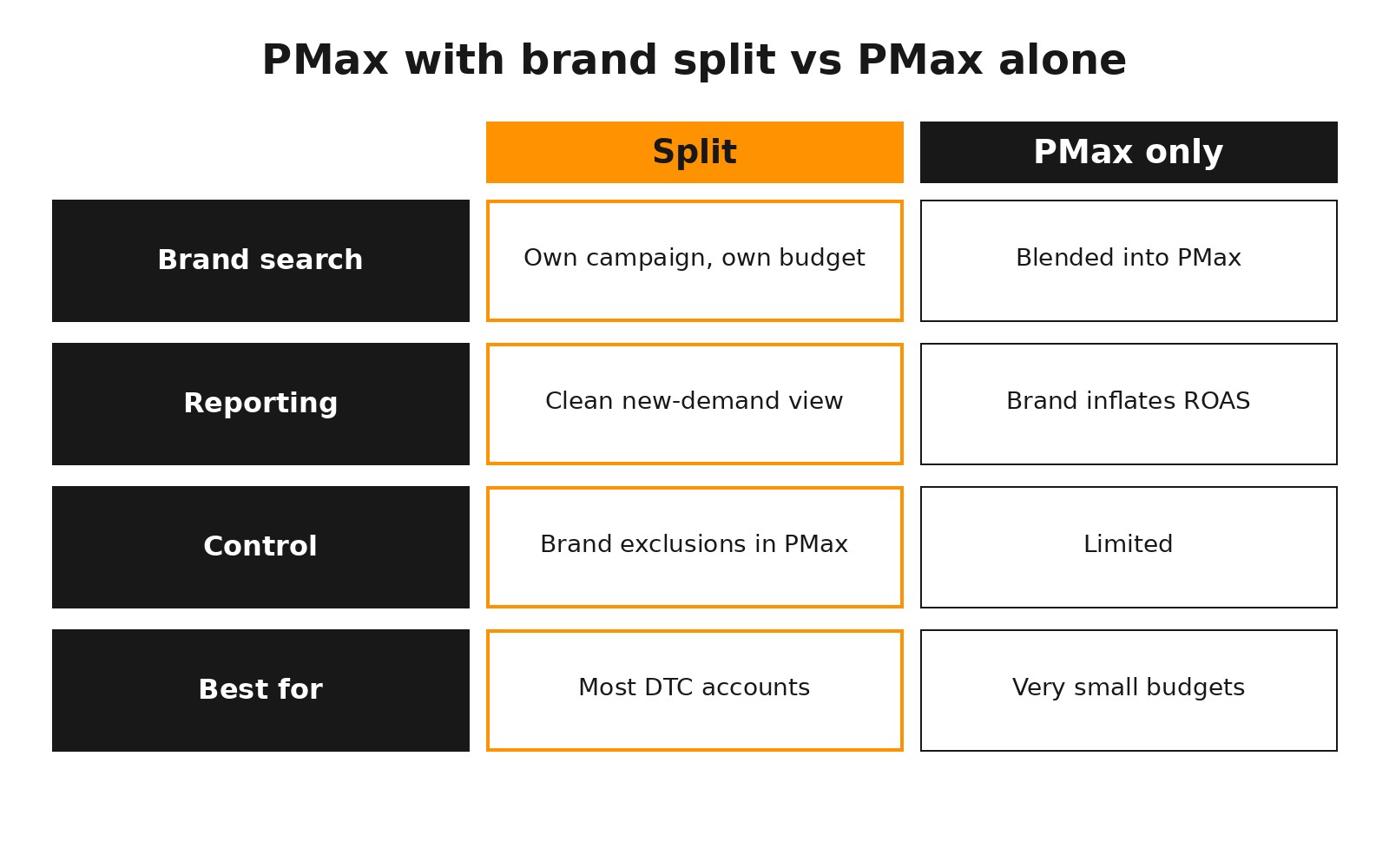
Performance Max will happily serve on your own brand terms, because people searching your name convert at very high rates. That makes PMax ROAS look excellent while the actual new demand it creates may be small. Splitting brand out fixes the reporting and the budget allocation.
Splitting brand out of PMax gives cleaner new-demand reporting.
How to split brand from PMax
Create a brand list in Shared Library and apply it as a brand exclusion on each PMax campaign (search and Shopping inventory).
Add your brand terms as account-level negative keywords for non-brand campaigns if you run them, so brand only lives in Brand Search.
Run Brand Search with a modest budget. You are defending your name, not scaling it; spend should track brand demand you created elsewhere.
Watch brand CPCs and impression share weekly. Rising CPCs usually mean a competitor is bidding on you.
When PMax alone is fine
If total Google spend is very small and brand volume is minimal, a single PMax campaign can be acceptable while you build data. Once brand search becomes a real share of conversions, split it.
Other PMax levers that matter
Asset groups by theme, not by every product. Each asset group gets its own images, headlines and audience signals.
Listing groups to exclude low-margin or out-of-stock items, or to isolate hero products.
New customer acquisition goal set to "bid higher for new customers" or "only new customers" when you upload a customer list. This is the closest Google gets to rewarding true acquisition.
Search themes and audience signals are hints, not targeting. Use them to steer early learning, then let performance data take over.
The product feed is your targeting
In Shopping and PMax, there are no keywords: Google reads your feed to decide which searches to match. Feed quality is targeting quality.
Titles: lead with what people search – brand, product type, key attribute (size, material, flavor), then model. "Organic Cotton Crew Tee – Men's – Black" beats "The Essential."
Images: clean primary image, plus lifestyle images where allowed.
GTINs, brand and Google product category filled in correctly.
Custom labels for margin tier, bestseller status and seasonality, so you can split campaigns and listing groups without rebuilding.
Fix disapprovals weekly in Merchant Center. A disapproved bestseller is lost revenue.
Search terms, negatives and match types
For Search and Standard Shopping, the search terms report is where waste hides. Review it weekly, add negatives for irrelevant intent (free, jobs, DIY, wrong product types), and promote proven converting queries into exact or phrase keywords. PMax now shows search term insights and supports account-level and campaign-level negatives, so check those too.
Broad match works with smart bidding and good conversion data, but it needs a strong negative list. Start with phrase and exact on smaller budgets, and test broad once tracking and negatives are solid.
Bidding and budgets
Maximize conversion value without a target while a campaign gathers data, then add a target ROAS set near what it is already achieving.
Move targets in small steps (roughly 10–15%) and give each change a week or two before judging.
Don't starve campaigns. A tROAS campaign that is budget-limited can't find new volume; one that is target-limited needs a looser target, not more budget.
Set targets from margin, not habit. Your break-even ROAS is 1 ÷ contribution margin %. A 50% margin product breaks even at 2.0x on first purchase.
MER framing: how to judge Google
Platform ROAS is a steering signal, not the truth. Google, Meta and email all claim credit for the same orders. The question for the business is simpler: when total ad spend goes up, does total revenue and new-customer revenue go up enough?
MER (marketing efficiency ratio) = total store revenue ÷ total ad spend across every channel.
New-customer MER / aMER = new-customer revenue ÷ total ad spend. This is the better acquisition metric.
Set a MER floor from your margins and LTV, then let Google's tROAS float within it.
Use brand search volume as a read on whether Meta and YouTube are creating demand. If brand searches grow, Brand Search will look good – but the credit belongs upstream.
Test incrementality with a geo holdout or a short non-brand pause when spend is meaningful. See our guide on why Meta ads stop scaling even with solid ROAS for the same logic applied to Meta.
The weekly Google Ads checklist
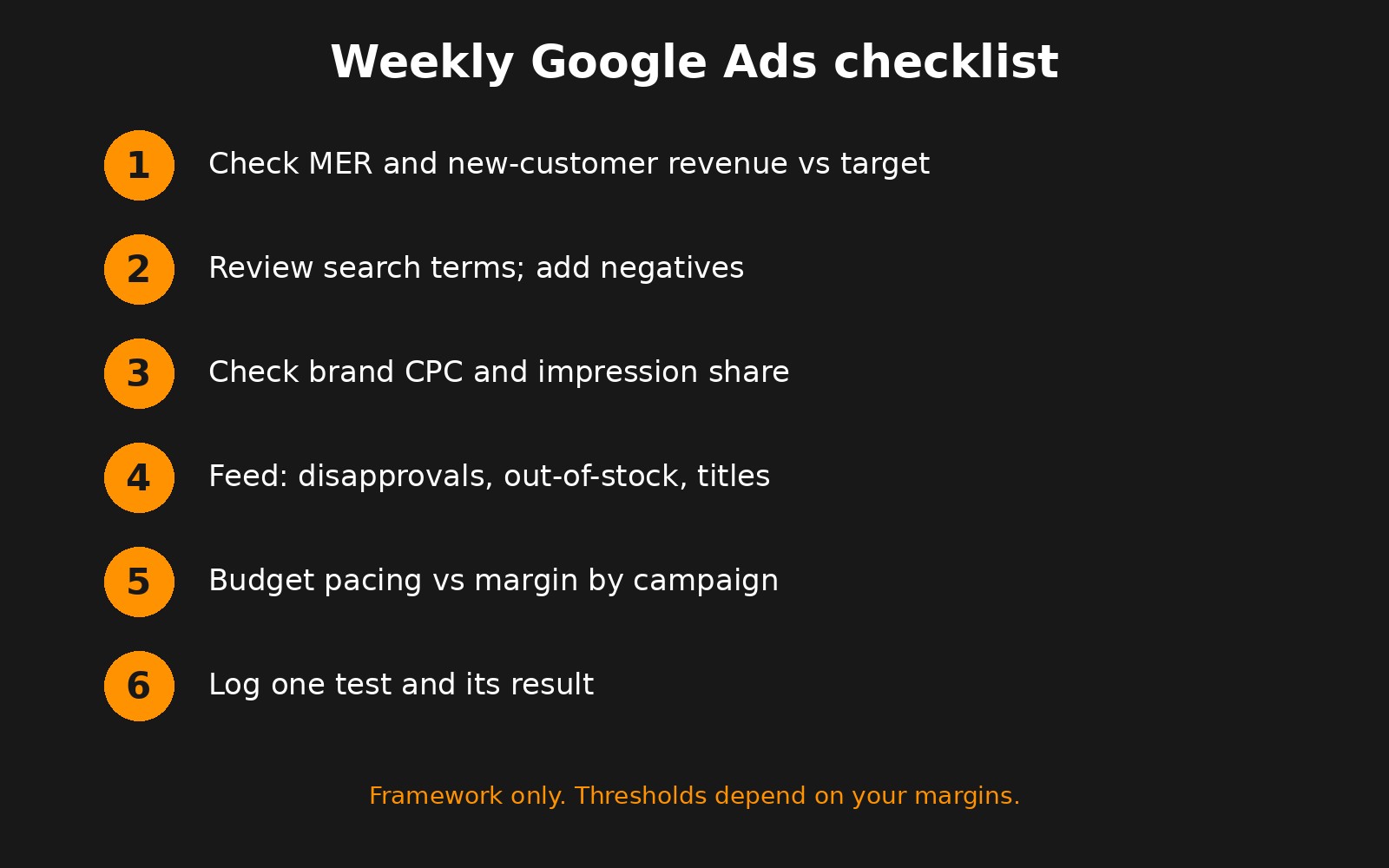
A weekly routine that takes under an hour.
Business check: blended MER, new-customer revenue and Google spend share vs. last week and target.
Search terms: add negatives, promote winners.
Brand: CPC, impression share, competitors in auction insights.
Feed: disapprovals, out-of-stock items still spending, title fixes.
Pacing: which campaigns are budget-limited vs. target-limited; reallocate toward margin.
Assets: replace low-rated PMax assets, add new images or video from your creative pipeline.
One test: log a single change (target, structure, landing page) and its result, so the account gets smarter every week.
Run the same checklist monthly with a wider lens: margin by campaign, new vs. returning revenue, and whether Google's share of spend still matches its contribution to MER.
Bringing it together
A well-run Google Ads account for a DTC brand is rarely complicated. It has clean tracking, brand separated from prospecting, a feed that describes products the way people search, sensible tROAS targets set from margin, and a weekly routine that measures success in MER and new customers. Lion Media runs Google alongside Meta for DTC brands so both channels are judged on the same business numbers. If you want a second opinion on your account, talk to us.
FAQ
Is Performance Max good for ecommerce?
Yes, for most DTC brands with a clean feed and reliable purchase tracking. Apply brand exclusions so PMax isn't credited for people already searching your name, and judge it on new-customer revenue and MER.
Should I run brand search separately from Performance Max?
In most accounts, yes. A separate Brand Search campaign with brand exclusions on PMax gives cleaner reporting, protects your name from competitors, and stops brand conversions from inflating PMax ROAS.
What target ROAS should I set in Google Ads?
Start from break-even ROAS (1 ÷ contribution margin) and the campaign's current performance. Set tROAS close to what it already achieves, then adjust in 10–15% steps every week or two.
How often should I optimize a Google Ads account?
Weekly for search terms, feed issues, brand CPCs and pacing; monthly for structure, targets and margin review. Constant daily changes usually reset learning and hurt performance.
What is MER and why use it for Google Ads?
MER is total revenue divided by total ad spend across all channels. Because every platform over-claims credit, MER and new-customer revenue show whether Google spend is actually growing the business.
Ready to Build?
Want this applied to your brand?
Book a free 30-minute growth audit. We'll review your ads, tracking and site, and show you where the profit is leaking.
No commitment. No pitch deck. A real conversation about your growth architecture.
Written by Frank Kenne, Lion Media
Lion Media is a performance marketing agency for DTC ecommerce brands. We build paid media and growth systems around MER and contribution margin, not platform ROAS.